How it works
From content ingestion to automated action in one pipeline.
1. Ingestion
Content arrives via API, webhook, or social platform connector.
2. AI Moderation
Smart routing sends content to the best provider. Standardized result returned.
3. Rules & Actions
Rules engine evaluates results. Actions execute automatically.
4. Manual Review
Edge cases flagged for human moderators to approve or reject.
Content arrives from anywhere
Submit content through any channel. Use the direct API for programmatic access, configure webhooks to receive content from external platforms, or set up native social media connectors that ingest comments and posts automatically.
- API: POST /v1/moderation for single or batch moderation
- Webhooks: Generic endpoint receives and normalizes external payloads
- Connectors: Native Facebook, Instagram, YouTube integration
Example: Facebook comment
// Facebook sends comment via webhook
{
  "source": "facebook",
  "content_id": "comment_123",
  "author_id": "user_456",
  "text": "Comment text here...",
  "metadata": {"post_url": "..."}
}AI moderates the content
Content is routed to the best available provider based on language, content type, category requirements, and cost. Each provider returns standardized results with scores from 0.0 to 1.0 across 10 content categories.
- Smart routing: Picks the best provider if not specified
- BYOK: Use your own provider API keys (or use platform keys)
- Standardized output: Same format regardless of provider behind the scenes
Standardized response
{
  "model": "openai/omni-moderation-latest",
  "results": [{
    "category": "hate",
    "score": 0.02,
    "flagged": false
  }],
  "flagged": false,
  "usage": {
    "latency_ms": 243,
    "provider": "openai"
  }
}Rules enforce your policy
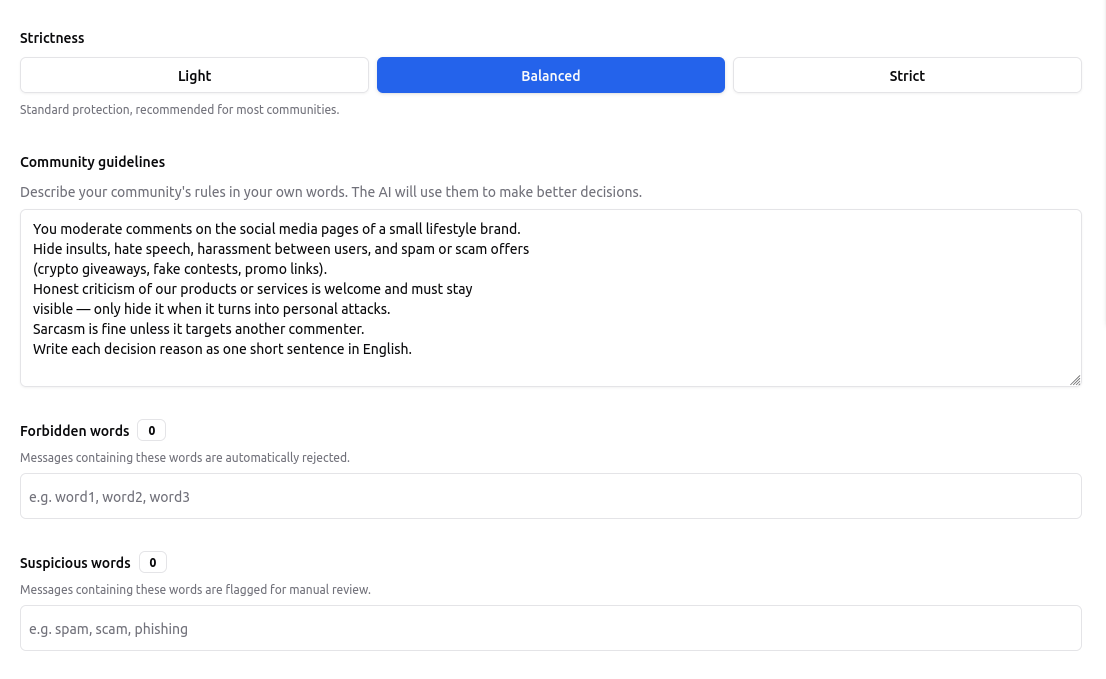
Define your moderation rules with three simple tools: forbidden words for instant blocking, category thresholds for automated decisions, and your community charter written in plain language for context-aware AI moderation.
Forbidden words block content instantly, before any AI call — zero cost
Category thresholds trigger automatic actions when scores exceed your limits
Your community charter guides context-aware AI decisions and sets the tone for your platform
For developers: API configuration
// Configure your moderation thresholds
PUT /v1/settings

{
  "thresholds": {
    "hate":       { "accepted": 0.3, "rejected": 0.7 },
    "harassment": { "accepted": 0.3, "rejected": 0.7 },
    "sexual":     { "accepted": 0.2, "rejected": 0.8 },
    "violence":   { "accepted": 0.3, "rejected": 0.7 },
    "self-harm":  { "accepted": 0.2, "rejected": 0.8 },
    "spam":       { "accepted": 0.4, "rejected": 0.8 }
  },
  "actions": {
    "on_reject": ["hide", "flag_for_review"]
  }
}Review edge cases manually
A dedicated, intuitive workspace for your Trust & Safety teams. Review flagged content, manage user reports, and override AI decisions with full auditability.
- Approve / Reject in one click — every override logged with who decided and why
- Use the moderation console to approve or reject flagged items
- Webhook notifications for new review items
Everything is logged
// Complete audit trail for every content item
{
  "content_id": "...",
  "source": "webhook",
  "platform": "facebook",
  "status": "actioned",
  "moderation": {
    "provider": "openai",
    "flagged": true,
    "results": [...]
  },
  "actions": [{
    "rule": "Hide hate speech",
    "type": "hide",
    "status": "executed"
  }]
}
Action Engine
When your rules are triggered, the Action Engine applies your decision on the platform itself — automatically. Every action is logged.
Hide automatically
Rejected content is hidden on Facebook & Instagram and rejected on YouTube. Your community never sees it.
Hold for review
Borderline content is held back and waits in your review queue — nothing published, nothing lost.
Publish & restore
Clean content goes live as normal. When a moderator approves a held comment, it's published.
Notify your tools
Every decision can reach your own tools via webhook for custom workflows and integrations.
No credit card required
Protect your Facebook page in 5 minutes.
Connect your Page, write your rules in plain language, every hidden comment comes with a written reason.
No credit card required
Questions? contact@openmoderation.com